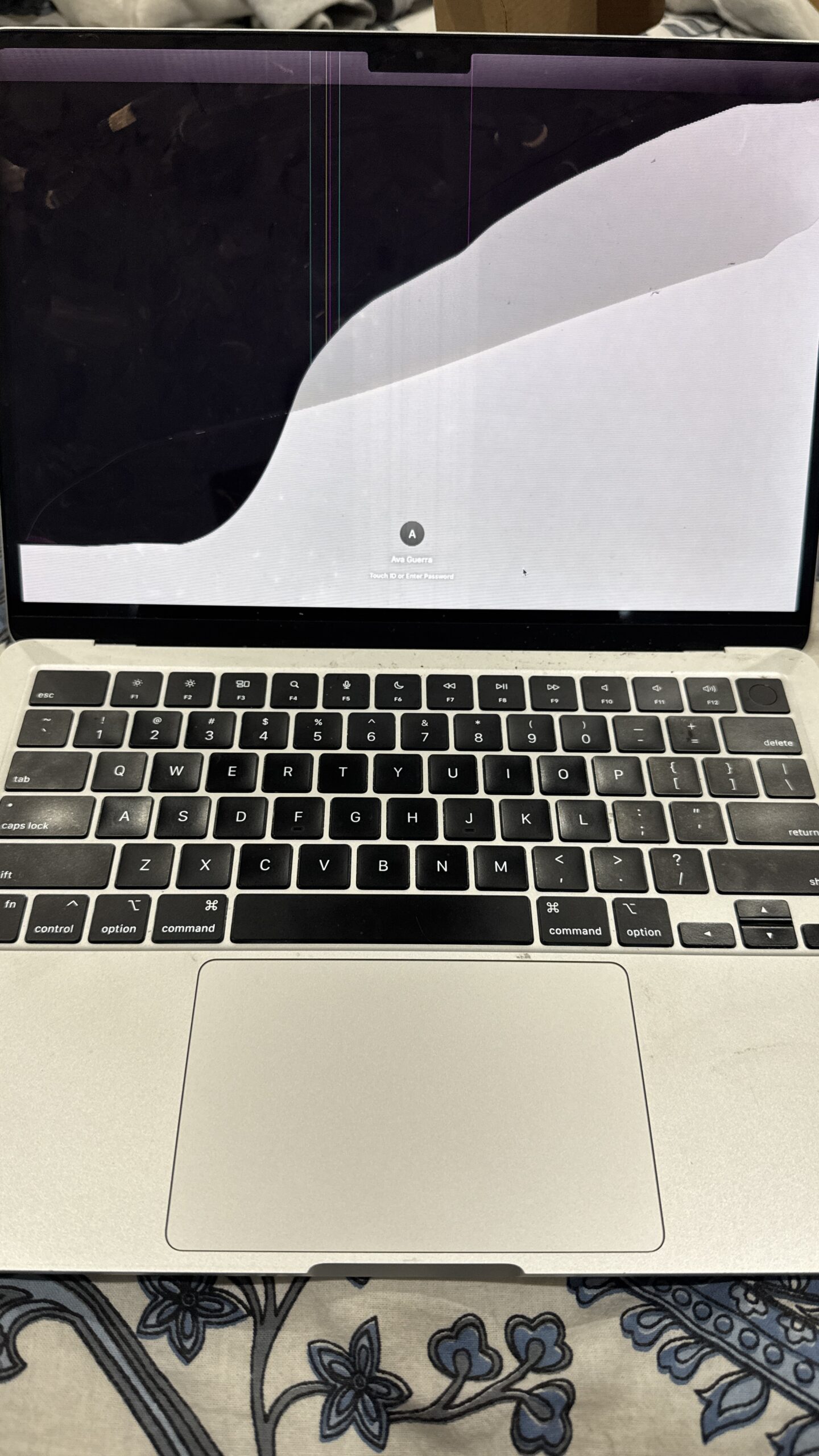
A MacBook that has been dropped and still shows a picture feels like a lucky escape. Sometimes it is. But a good share of the display repairs that come into our Bentleigh East workshop started as a drop where “nothing looked wrong”, and the damage only showed itself a few days later. This post covers what a drop actually does to a MacBook display, what to inspect even when the glass is unbroken, and when it is worth bringing it in.
What a drop does inside the lid
The MacBook lid is thin aluminium with a glass-fronted LCD, a strip of LED backlights along the bottom edge, and a pair of flexible cables routed through the hinge into the logic board. An impact does not need to crack the glass to hurt any of these. Common results we see:
- Fractured LCD under intact glass – shows as a dark patch, a blotch that spreads, or coloured lines starting from one corner.
- Creased or strained display cable – flicker, a pink or green tint, or a screen that works only when the lid is at one angle.
- Backlight damage – a dim band along the bottom (stage-light effect) or a screen that goes dark while the Mac keeps running.
- Bent lid frame or hinge – the lid no longer sits flat, which keeps stressing the panel and cables every time it opens.
- Pressure marks – bright or mottled spots where the panel was pushed against the keyboard, usually from a drop with the lid closed on something.
A five-minute check you can do at home
- Open a plain white page (a blank document works) and look for dark patches, dots or faint lines, especially near the corners that took the hit.
- Open a black image in full screen in a dark room and look for bright spots, uneven brightness or a glow along the bottom edge.
- Slowly move the lid from nearly closed to fully open while watching the screen. Any flicker, colour shift or blackout at a certain angle points to the cables.
- Close the lid and look along it edge-on. A visible bow or a corner lifting away means the frame is bent.
- Run your fingertip around the edge of the glass for any sharp chip; a chip can grow into a crack with temperature changes.
If any of those show something, back up your Mac now while it is still displaying. We have a guide on what to back up before a screen repair on our blog.
How we assess a dropped MacBook
Our assessment goes further than the panel. We test the display on an external monitor to confirm the graphics are fine, inspect the display cables and backlight connector at the hinge under magnification, check the hinge tension and lid alignment, and look at the logic board around the display connector for cracked solder joints. Then we tell you plainly which parts are damaged and whether the display assembly, the cables or the lid frame need replacing.
On modern MacBook Air and Pro models the display is replaced as a complete lid assembly, which includes the glass, panel, backlight and cables, so a drop that damaged several of those is covered by one part. Our repair or replace guide for cracked MacBook screens covers the decision in more detail.
Cost and time in general terms
A display assembly on a recent Air or Pro is the most significant single repair on the machine, and the price varies a lot by model and panel type, so we quote per model rather than publish a flat figure. Cable-only repairs are far cheaper. Most display replacements are completed the same or next day once the assembly is in stock. Use our model number guide and MacBook models list so we can quote accurately before you come in.
When to bring it in
Book an assessment if you see any dark patch, line, flicker or angle-dependent fault after a drop, if the lid no longer closes flat, or if you simply want certainty before a big trip or deadline. Catching a creased cable early can save the panel from being damaged by the strain later.
Frequently asked questions
The glass is fine but there is a black blob in the corner. What is it?
That is the LCD layer underneath cracking from the impact. The outer glass on a MacBook is tougher than the panel behind it, so the panel can fracture while the glass stays intact. The blob usually grows over days, so a replacement is needed.
Can a drop damage the display without any visible mark?
Yes. The display cables and the backlight connector sit in the hinge area, and a knock to the lid corner can partially unseat or crease them. Symptoms include flicker, a dim screen or a display that only works at certain angles.
Is it worth replacing the display on an older MacBook after a drop?
It depends on the model and what else was damaged. We check the hinges, lid frame and logic board as well as the display before quoting, so you are not paying for a screen on a machine with a bigger problem.
Should I keep using it if the screen looks okay?
Use it, but back up straight away and watch for new lines, flicker or spreading dark patches. If any appear, stop pressing the lid and book it in.
Macbook Screens is at 2 Bellevue Road, Bentleigh East VIC 3165, with parking at the door, open 7 days from 5am to 11pm. Call 0421 388 876 to book a post-drop display check, or see our services page for everything we do with MacBook displays.
Leave a Reply